@bulbacar Sì, la scorciatoia da tastiera non c'è nelle versioni Intel in particolare. Rimane molto strano che non riesci ad averla, ma ho letto che è sensibile alla versione driver per molti ( c'è chi persino ha adattivo 60Hz con una versione e 85Hz con un'altra ).
Ottima guida, se vuoi posso fornirti qualche info in più sulla cosa, dato che lenovo vantage si comporta in maniera diversa a seconda del modello. Ad esempio sul mio legion 7 (ryzen+3080) non è possibile fare oc della GPU se non dal bios (e cmq non in modo "preciso" come nel tuo caso), ne è possibile abilitare la modalità ibrida delle gpu (posso solo disattivare la 3080 ma richiede riavvio della macchina).
Resta cmq un'app utile, per carità, ma da quel che vedo mi sembra piu articolata nei modelli di fascia piu bassa...
P.S.
Davvero smonti tutto e ripulisci una volta al mese? Io non mi oso per paura di invalidare la garanzia, macina come un disperato il mio legion da febbrario 2022! 🤣
@Kaywen Il tuo modello è del 2021? Perchè nel mio L5P 2021 Ryzen potevo appunto farlo solo da BIOS. Mi chiedo a questo punto se Vantage consideri l'anno di produzione. Inoltre hai l'ultima versione di Vantage?
Riguardo le pulizie mensili o poco più... sì, vado di spazzola per la polvere sotto il coperchio ( specie nelle ventole ) e sulla tastiera ( con spazzole dedicate e la melma da spiattellare ). 😁
@Lascax ah ok, pensavo che ripastavi cpu e gpu una volta al mese, mi sembrava eccessivo!
Adesso sono al lavoro quindi non posso verificare che versione sia il mio legion, stasera ci guardo e te lo dico, ma è possibile che sia un 2021 visto che l'ho preso a febbraio 2022 a 2500k circa (che se consideri il periodo, altri laptop con quelle caratteristiche stavano 1k euro sopra). Per quanto riguarda la versione di vantage si, ho tutto aggiornato (mi è arrivata anche l'ultima versione di w11 settimana scorsa).
L'unica cosa che mi manca è l'update bios di dicembre, aspetto sempre un po prima di aggiornare i bios quando vengono rilasciati.
@Kaywen Il Legion 7 2022 è arrivato in Italia con un bel po' di ritardo, praticamente nella seconda metà, quindi è molto probabile che il tuo sia il modello 2021 ( ovviamente comunque un eccellente acquisto in quel periodo ).
Prova ad aggiornare BIOS e Vantage in caso, se tieni veramente tanto a quella opzione. Riguardo ad aggiornare il BIOS in generale consiglio sempre di farlo se ti porta una feature di cui hai bisogno o se hai comunque altri motivi impellenti per farlo.
@Kaywen Il Legion 7 2022 è arrivato in Italia con un bel po' di ritardo, praticamente nella seconda metà, quindi è molto probabile che il tuo sia il modello 2021 ( ovviamente comunque un eccellente acquisto in quel periodo ).
Prova ad aggiornare BIOS e Vantage in caso, se tieni veramente tanto a quella opzione. Riguardo ad aggiornare il BIOS in generale consiglio sempre di farlo se ti porta una feature di cui hai bisogno o se hai comunque altri motivi impellenti per farlo.
Mi sembra porta qualche fix a falle di sicurezza e qualche correzione di bug. In ogni caso stasera saprò dirti con più precisione.
Dunque, il mio è il modello 82N600ADIX e dovrebbe essere appunto 2021.
Per le impostazioni audio ho fatto una breve prova, ma se il suono demo sembra davvero fantastico, i suoni di windows in generale risultano parecchio distorti rispetto a ciò che sono abituato. Farò ulteriori prove nel weekend se mi avanza un po di tempo.
@Kaywen Se il tuo modello è pienamente 2021 allora molto probabilmente non è Adattivo. Il problema del mancato funzionamento di Fn+R è stato discusso ampiamente nei forum tecnici di Lenovo e sui Discord dedicati: pare che l'unica soluzione è un workaround dove tramite un programma di terze parti associ la pigiatura di quei tasti al cambio di refresh-rate. Inoltre dovrebbe essere stato fatto un tool da appassionati Legion di LaptopWiki per cambiare automaticamente il RefreshRate se si passa da alimentazione a batteria verso quella continua.
Un'altra ricerca che puoi fare è trovare dalla pagina della garanzia del tuo modello specifico lo schermo di ricambio e cercarne le specifiche tecniche.
@Kaywen Se il tuo modello è pienamente 2021 allora molto probabilmente non è Adattivo. Il problema del mancato funzionamento di Fn+R è stato discusso ampiamente nei forum tecnici di Lenovo e sui Discord dedicati: pare che l'unica soluzione è un workaround dove tramite un programma di terze parti associ la pigiatura di quei tasti al cambio di refresh-rate. Inoltre dovrebbe essere stato fatto un tool da appassionati Legion di LaptopWiki per cambiare automaticamente il RefreshRate se si passa da alimentazione a batteria verso quella continua.
Un'altra ricerca che puoi fare è trovare dalla pagina della garanzia del tuo modello specifico lo schermo di ricambio e cercarne le specifiche tecniche.
Il fatto che non cambia refresh in modo adattivo non mi cambia la vita, la menata è se devo passare alla radeon integrata e sono già a batteria: spreco tutto il tempo di boot+cambio modalità (disattivazione 3080) e il riavvio successivo.
Tuttavia, alla fine, è un non-problema: va bene cosi, la cosa che piu che altro mi dispiace è la mancata possibilità di fare un OC tipo il tuo. Posso portare la vga da 150 a 175watt da bios, ma onestamente non ne sento il bisogno, al momento.
Tra Black Friday e Natale immagino che molte persone potrebbero trovarsi tra le mani un Lenovo Legion e siano ansiosi di sfruttarne al meglio le sue potenzialità. Uno strumento molto utile per farlo è proprio quello per cui questa Guida vi darà delle indicazioni per farlo al meglio e in modo, soprattutto, sicuro: Lenovo Vantage. Questo software vi permette di abilitare e modificare molte impostazioni importanti del vostro Legion ed è per questo che propongo una guida rinnovata dopo quella dell’anno scorso. A grandi linee sarà valida anche per versioni software precedenti al 2022 e per i laptop come comunque lo presentano pre-installato ( sempre della serie Legion, ovviamente ). Lenovo Vantage è uno dei rari casi in cui un software pre-installato è effettivamente utile e fondamentale per un laptop da gaming, quindi saperlo usare al meglio è fondamentale: non parlerò di ogni singola funzione ma cercherò di essere il più esaustivo possibile su quelle principali, con le mie personali raccomandazioni. Detto questo, iniziamo.
LEGION EDGE
Questo pannello rapido ci permette di attivare le funzioni principali del Laptop e di poter soprattutto determinare e modificare la potenza più adeguata alle nostre esigenze. Partiamo dalla Modalità Termica
Questa Modalità di utilizzo è la stessa che possiamo cambiare con la combinazione di tasti Fn+Q e sono ben descritte nel pannello dedicato di Vantage. Vi riepilogo in breve come e quando utilizzo personalmente queste modalità:
Silenziosa: sempre quando non sono collegato alla presa elettrica, spesso se non sto giocando o usando applicativi. Risparmio notevole di batteria e che spesso è meglio abbinare ad un cambio di Refresh Rate dello schermo minore. Per i Legion 2022 questo avviene automaticamente se si seleziona il Refresh Rate Adattivo dalle impostazioni dello schermo ( ne sono certo per le versioni Intel, non so riguardo quelle AMD ). Per i Legion 2021 è possibile utilizzare invece il cambio diretto tramite combinazioni di tasti Fn+R per passare dai 60Hz al limite massimo e viceversa. Ricordate di tornare con questi ultimi al limite massimo una volta che ricollegate la presa elettrica.
Bilanciata: la uso criminosamente molto meno di quando dovrei. In teoria è adatta per quando vogliamo avere il compromesso e non ci interessano prestazioni eccezionali. Lo raccomando se per esempio stiamo lavorando con applicativi da lavoro ( tipo Unity ) o con giochi non molto pesanti ( nulla di next-gen o per esempio molti MMo e giochi multi-piattaforma non pesanti, come Genshin Impact ).Una nota su Legion AI Engine: in teoria questo componente migliora l’esecuzione di alcuni giochi attivando una sorta di Modalità Prestazioni dedicata, ma il vero problema che ho riscontrato è che non ho avuto modo nè di testarla nè di avere un elenco di questi giochi. A mio malgrado ho dovuto ignorare questa componente, ma spero che Lenovo ci dia più documentazione in futuro.
Prestazioni: tutte le massime prestazioni che vogliamo. Ovviamente la Modalità con cui spesso si giocherà ai titoli più recenti e che è attivabile solo con l’alimentazione diretta. In teoria più rumorosa, ma non è una grossa differenza dal Bilanciato, stando ai miei test. Inoltre in questa Modalità la vostra CPU tenderà ad utilizzare il Turbo-Boost, se possibile, per aumentare il suo clock a limiti massimi solitamente non utilizzati.
Dell’Overclock e delle Modalità di lavoro parlerò in un paragrafo dedicato, quindi passiamo oltre al momento. Ecco alcune mie raccomandazioni per le opzioni successive. Ottimizzazione rete: in teoria dovrebbe limitare la rete per ogni applicazione che non è un videogioco. In realtà funziona semplicemente male e la terrei sempre disattivata: limita fin troppo la banda di OGNI altra App mentre state giocando, incluso Discord che è abbastanza grave.Sono stato giorni a cercare di capire perchè non riuscissi a streamare i miei giochi come si deve e come per magia disabilitando questa voce sono tornato ad avere il controllo della mia rete. Sì, potete aggiungere le eccezioni, ma volete seriamente andare ad aggiungerle una ad una man mano che vi servono per risparmiare, onestamente, risultati marginalmente migliori e non certi ( non tutti i giochi sono rilevati )? Lasciatelo disabilitato e dimenticatevene. Over Drive: opzione che permette allo schermo di mantenere una latenza media costante. Stiamo parlando di cifre che viaggiano intorno ai millisecondi, quindi nulla che in realtà noterete a meno che siate veramente dei pro-player ma comunque suggerisco di mantenerlo attivo per evitare salti da 1 a 5ms di ritardo e rimanere, stando a svariati test, circa sui 2,2msmedi. NOTA: alcuni hanno notato degli artefatti grafici strani in alcuni giochi lasciando questa opzione abilitata. Tenetelo a mente se mai avete problemi simili e disabilitatela in tal caso. Blocco touchpad: in teoria potete farlo pure con Fn+F10. Consiglio di disabilitarlo in particolare sui modelli 2021 che ha un touch molto sensibile a sfioramenti, molto probabili mentre scrivete e se comandate coi classici WASD nel gaming. Il modello 2022 ha un touchpad più largo ma allo stesso tempo ho notato che rileva molto meglio la differenza tra la pigiatura delle dita e gli sfioramenti del palmo della mano, per cui non ho avuto problemi. A vostra discrezione.
OVERCLOCK E GPU
Partiamo dalla spiegazione di cosa comportano le due principali Modalità di lavoro della GPU. Come molti moderni laptop da gaming, la GPU integrata e quella dedicata ( molto spesso la vostra NVidia ) possono coesistere o escludersi a vicenda. In sostanza, si tratta di scegliere tra due compromessi:
Ibrido: le due GPU si alternano a seconda del carico di lavoro. Ciò comporta l’utilizzo dell’Optimus, cioè di una tecnologia che permette di passare il carico di lavoro da una all’altra in modo dinamico quando avviate i giochi. Il vantaggio è che i consumi saranno molto ridotti e avrete una autonomia in batteria notevolmente maggiore, mentre lo svantaggio è che rinunciate ad una percentuale di performance poichè questa co-esistenza significa che i vostri dati dovranno comunque passare attraverso la CPU integrata, causando spesso un calo di prestazioni di circa il 10% della vostra GPU dedicata. Inoltre la VRAM della vostra scheda video integrata viene presa dalla RAM del sistema ( solitamente 2GB ). Un compromesso che dipende da cosa preferite. NOTA: se collegate uno schermo esterno molto probabilmente avrete prestazioni migliori poichè i dati passeranno direttamente dalla GPU dedicata senza intermediari.
dGPU: tramite ilMUX Switch interno in sostanza sin dall’avvio la scheda video integrata sarà disabilitata totalmente. Prestazioni senza limiti col compromesso di maggiori consumi energetici e minore autonomia della batteria ( circa il 30% stando ai miei test ).
Adesso passiamo ad un argomento delicato con un importantissimo avviso: NON FATE OVERCLOCK SE NON SIETE PERSONE PAZIENTI E RESPONSABILI. Sebbene la procedura tramite Vantage è rapida da applicare, dovete essere pazienti ed essere pronti ad assumervi sia la responsabilità di tale procedura sia ad effettuare svariati test che potrebbero anche durare giorni. Adesso andiamo a vedere i valori possibili tipicamente sui Lenovo Legion ( nel mio esempio una NVidia GPU 3070Ti ): Come vedete ho messo tutto al massimo, ma non ci sono arrivato semplicemente spostando tutto a destra, ma con circa due settimane di test approfonditi. Fare un Overclock significa, in sostanza, spingere oltre i valori stabili, sicuri e garantiti di fabbrica il vostro componente ( in questo caso la GPU ). Il mio consiglio è di procedere a scaglioni di 25MHz per la GPU e di 50 MHz per la VRAM. Quindi, al vostro primo tentativo avrete un +25/+50. Una volta fatto, avviate un benchmark e vedete intanto se ci sono artefatti, rallentamenti improvvisi, salti di frame o temperature limite raggiunte troppo in fretta. Se tutto va bene, giocate ALMENO tre ore ad un gioco con requisiti importanti sul lato GPU ( non MMO o Shooter online, ma giochi next-gen come CyberPunk 2077 o Plague Tale: Requiem ). Se nuovamente va tutto a posto, procedete ad un altro scaglione. NON fate salti superiori. Dovete in sostanza provare che riuscite a trovare il giusto equilibrio che non dia problemi: non tutte le GPU sono uguali e non tutto il fabbricato in silicio dà prestazioni stabili a certi valori. Io sono stato fortunato, ma non datelo assolutamente per scontato, anzi, aspettatevi un limite. Se notate dei problemi tornate indietro di uno scaglione e rimanete lì, o riprovate tornando indietro solamente con uno dei due valori ( solitamente è il clock della GPU il più sensibile ). Se ci ho messo due settimane c’è un motivo. Ovviamente avere una buona areazione del laptop con una buona piattaforma e mantenerlo pulito è molto importante e può variare la stabilità dell’Overclock.
ALIMENTAZIONE
Tra i vari Strumenti del Sistema una importante voce è quella dell’Alimentazione. Qui vi indicherò alcune funzioni molto utili che potete tenere in considerazione:
Modalità conservazione: se utilizzate il vostro Legion spesso in alimentazione diretta potete considerare di abilitare questa opzione. In sostanza bloccherà la carica della batteria ad una data % ( 55%->80%, dipende dal modello ). Questo vi permette di avere una batteria più longeva in generale. Ovviamente disabilitatelo se pensate di scollegarlo a breve o spesso poichè avreste una carica minore di quella massima. In sostanza l’usura della batteria è data soprattutto da quanto spesso rimane a carica massima continuamente alimentata. Se si scarica e carica spesso quasi completamente non avrà grossi problemi nel tempo.
USB sempre attiva: le porte USB sul retro col simbolo della batteria possono alimentare anche a PC spento. Utile se volete ricaricare dispositivi e come me lasciate spesso il laptop collegato alla presa elettrica da spento. È anche possibile abilitare questa funzione col laptop scollegato e spento, ma ovviamente ciò comporterà una scarica della batteria.
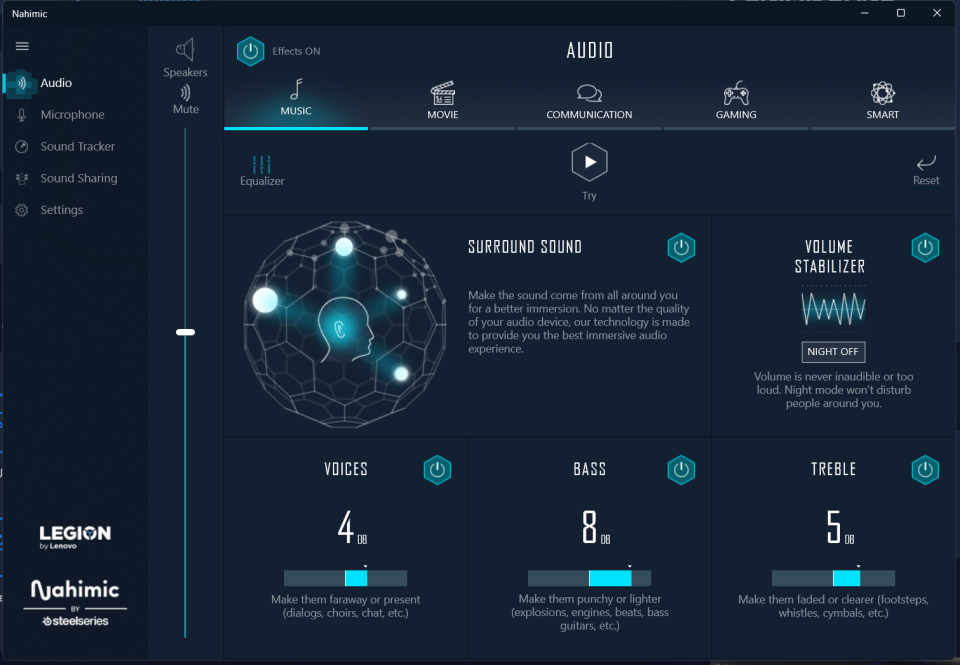
NAHIMIC
La gestione del suono del vostro laptop. Qui potete regolare vari effetti e funzionalità, anche dedicate a vari tipi di utilizzo, e abbinare tali modifiche anche alle periferiche collegate. Il mio consiglio è di non usarlo se avete delle cuffie, bluetooth o USB che siano, poichè spesso avrete degli effetti Eco non desiderati, spesso con VoiceApp. Piuttosto vi lascio qui sotto le mie impostazioni personali raccomandate per il Legion 5Pro ( sia 2021 che 2022 ) e per il Legion 7 2022 trovato dal server Discord dedicato di LaptopWiki. Per chi vuole spingersi oltre qui ci sono anche delle istruzioni per degli ulteriori miglioramenti tramite EqualizerAPO e la sua estensione PEACE. Allego a questo link MEGA i file .peace per Legion 5 e Legion 5Pro.
[LEGION 5 Pro 2021/2022]
[LEGION 7 2022]
Le opzioni di cui sopra potrebbero essere anche valide per il Legion 5 ( quelle del 5 Pro ) o per i Legion 7 2021, ma per questo fatemi sapere voi nei commenti.
IN CONCLUSIONE
Come vedete, già con un paio di utili indicazioni si può personalizzare molto l’utilizzo del laptop in modi anche non troppo ovvi tutto dallo stesso programma. Ho sorvolato su opzioni facilmente intuibili come il Legion Spectrum per i colori della tastiera o l’aggiornamento di sistema, ma ho voluto soffermarmi su impostazioni importanti e alcune funzionalità utili e non troppo in evidenza. Spero di aver fatto cosa gradita coi miei consigli e mi farebbe piacere confrontarci insieme su varie ottimizzazioni dedicate che avete trovato ( per esempio: voi avete trovato qualcosa di meglio per l’audio? Avete mai provato un overclock, e se sì quanto avete migliorato le prestazioni? ). Parliamone, come sempre, qui insieme!
Bella spiegazione, volevo chiederti però se io giocassi ad esempio ad un titolo come EA FC 24 e impostassi sulla modalità "silenziosa" ma nel contempo sono collegato alla rete elettrica, e dal gioco impostassi i settaggi grafici al max, sfrutterei tali impostazioni pur restando in mod silenziosa? Ho fatto esempio di EA FC 24 ma potrei dire Horizon piuttosto che Hogwarts Legacy etc più che altro non sono riuscito a capire o meglio in parte, cioè le modalità mi spingono il mio Laptop in più o in meno e ok, ma quando gioco a prescindere dalla modalità in cui è, come menzionato sopra avendo una modalità silenziosa posso giocare a settaggi max di un titolo?.
Registration to this forum is free! We do insist that you abide by the rules and policies detailed
below. If you agree to the terms, please check the 'I agree' checkbox and press the 'Complete Registration' button below.
If you would like to cancel the registration, click here
to return to the forums index.
Legion Community Terms and Conditions
Last updated 19th February 2021
Welcome to Legion Community (“Legion Community” or the “Platform") - powered by Standing on Giants*- an online communication platform operated by Lenovo (the “Client”).
Legion Community enables its registered users (the “Users") to post and share content, such as information about Lenovo products, services, events, social media activity and videos ("Content”) to the Platform.
Legion Community is provided by Lenovo through the services of Standing on Giants subject to these Terms (“Terms”). We reserve the right to amend these Terms at any time and without notice. If we amend the Terms, we will post the amended Terms on this page and indicate at the top of the page the date the Terms were last revised. Your continued use of the Platform after any such changes constitutes your acceptance of the new Terms.
By accessing or using Legion Community you signify that you have read, understood, and agree to be bound by these Terms. If you do not agree, then you should not access or use the Platform.
Lenovo’s decision in relation to any aspect of Legion Community and these Terms is final and binding.
Your Use of Legion Community Platform
ELIGIBILITY. This Program is open to Participants who are age 18 years or older at the time of entry. This Program is not open to: (1) employees or internally contracted vendors of [Client] or its parent/subsidiaries, agents or affiliates; (2) the immediate family members or members of the same household of any such employee or vendor; (3) anyone professionally involved in the development or administration of this Program; (4) employees or internally contracted vendors of governments and government-affiliated companies or organizations; or (5) any employee whose employer's guidelines or regulations do not allow entry in the Program. This Program is open to residents of Italy, Spain, Norway, Finland, Sweden, Denmark, Kingdom of Saudi Arabia, United Arab Emirates, South Africa. This Program is void in any other country and where otherwise prohibited or restricted by law.
HOW TO PARTICIPATE. To participate in the Program, visit accurately and truthfully complete the online registration form, agree to the terms and conditions of this Agreement, and follow the other instructions at the website listed above.
REWARDS. Subject to the terms and conditions of this Agreement, and once confirmed by [Client], Participants will be able to accrue “points” that can be redeemed for reward(s). Rewards will be featured at various price points and in limited quantities.
The approximate retail values of rewards are subject to change based on current market conditions at the time of reward redemption. Participants are not entitled to any surplus between actual retail value (ARV) of a reward and stated ARV and any difference between stated ARV and actual value of the reward will not be awarded. No substitution, assignment, transfer, or cash redemption of any reward is allowed. Lenovo reserves the right to substitute a reward with another reward of equal or greater value should the advertised reward become unavailable for any reason. If applicable, rewards may be fulfilled in the form of voucher(s), coupon(s) and/or gift card(s) in Lenovo’s sole discretion. If a Participant is unable to participate in or accept a reward or any portion of a reward for any reason, Lenovo shall have no further obligation to such Participant. Lenovo will not replace any lost or stolen rewards after redemption by Participants. In no event will Lenovo be responsible for fulfilling more than the stated number of rewards. Participants acknowledge and agree that rewards are available in limited quantities and reward type and availability are subject to change at Lenovo’s sole discretion. Lenovo shall have no obligation or liability to Participants for any changes made to reward type or availability.
Subject to your compliance with these Terms, Lenovo grants you a non-exclusive, non-transferable, limited right to access and use the Platform only for your personal, informational, and non-commercial use. You agree not to interrupt or attempt to interrupt the operation of the Platform in any way or circumvent or attempt to circumvent any security feature of the Platform. Your use of the information and Content available on the Platform is subject to the following restrictions:
You must not modify or remove any and all copyright, trademark or other proprietary notices contained in the Content.
You must not modify the Content in any way or reproduce or publicly display, perform, or distribute or otherwise use the Content for any commercial purpose.
No title or ownership rights in the Content or any intellectual property rights therein are transferred to you under these Terms. You may never use another user's account without the permission of that user. When creating your account, you must provide accurate and complete information and you must keep your account password secure. You must notify Lenovo immediately of any breach of security or unauthorised use of your account. Lenovo will not be liable for any and all losses caused by any unauthorised use of your account
You agree not to collect or harvest any personal data from the Platform including any personally identifiable information such as but not limited to account names, nor to use the communication systems provided by the Platform for any commercial solicitation purposes. You agree not to use any portion of the Platform as a destination linked from any unsolicited bulk messages or unsolicited commercial messages.
Your Content Posted or Linked to Legion Community
Lenovo allows you to submit posts or link content to Legion Community, including photos, images, videos, sounds, comments, links, tweets, likes, and other materials. A Legion Community moderator will moderate all posts after publication. Lenovo reserves the right to remove user’s content that it considers to be irrelevant to the purpose of the platform, or that it considers violates any of these Terms. Lenovo may also post or link to the Platform any of your Content that you make available to Lenovo for the Platform. You are solely responsible for your Content that is posted or linked to the Platform and Lenovo accepts no liability for your Content.
You grant Lenovo and other users of the Platform a non-exclusive, royalty-free, transferable, sub-licensable, worldwide license to use, store, display, reproduce, modify, create derivative works of, perform, publish, re-post, re-tweet, and distribute your Content on or in connection with the Platform.
You represent and warrant that you have all rights necessary in your Content for it to be on or available from the Platform, and that the posting and use of your Content on or through the Platform does not violate, misappropriate or infringe on the rights of any third party, including, without limitation, privacy rights, publicity rights, copyrights, trademark and/or other intellectual property rights. You further represent and warrant to the extent there are links on the Platform to your Content that is hosted on third party websites, such linking is permitted by the terms of service of any such third party websites. You agree to comply with all laws, rules and regulations applicable to your use of the Platform and your Content, including but not limited to copyright laws.
You agree that your Content will not include any violent, discriminatory, unlawful, infringing, hateful, defamatory, derogatory, harassing, pornographic or obscene photos, text, images, messages, references, content or other materials. In addition, your Content will not be confidential or proprietary, and Lenovo will have no confidentiality obligation regarding your Content.
You agree that Lenovo is only acting as a passive conduit for your online distribution and publication of your Content. Lenovo does not have any obligation to review your Content, and therefore does not guarantee the accuracy, integrity, or quality of all user Content and we cannot assure you that harmful, inaccurate, deceptive, offensive, threatening, defamatory, unlawful, or otherwise objectionable Content will not appear on the Platform. Lenovo is not responsible for any public display or misuse of your Content. Lenovo does however reserve the right to remove, exclude or modify your Content for any reason, at its discretion, including any Content that Lenovo believes violates these Terms or other applicable policies. UNDER NO CIRCUMSTANCES WILL LENOVO BE LIABLE TO YOU OR ANY THIRD PARTY IN ANY WAY FOR ANY CONTENT POSTED ON OR MADE AVAILABLE THROUGH A SITE BY YOU OR ANY OTHER USER.
Lenovo may reward points for certain activities on the Platform, including (but not limited to) sharing posts, creating posts and entering competitions. Subject to availability, Lenovo reserves the right at any time to amend, modify or retract any points, rewards or prizes earned on the Platform. You accept that Lenovo will not enter into any correspondence regarding the awarding of points or rewards and Lenovo is entitled to grant or revoke rewards at their discretion. The decision of Lenovo in relation to all aspects of this programme is final and binding.
Data Privacy and Security
Lenovo will communicate with you via email or push notifications (including via the Standing on Giants platform), about Legion Community related notices changes to features of Legion Community and any notices required by law, in lieu of communication by postal mail.. If required by law, we will ask you for consent before sending you marketing emails. Please note that you may unsubscribe to general marketing emails at any time using the link provided in the emails. You understand that your data may be shared with other Lenovo entities and trusted third parties with a contractual relationship with Lenovo solely in connection with Legion Community
Please read our Data Privacy Policy for more information on our privacy and security practices.
Representations and Warranties
You represent and warrant that:
(a) You will abide by and comply with these Terms;
(b) Your Content and Lenovo’s use thereof as contemplated by these Terms and the Platform will not infringe any rights of any third party, including but not limited to any intellectual property rights, privacy rights, and rights of publicity;
(c) You have the full power and authority to enter into these Terms and to the extent that any entity is bound hereby, to bind such entity, these Terms, and performance of obligations under these Terms do not and will not violate any other agreement to which you or such entity is a party; and
(d) You will comply with all applicable laws and regulations, including but not limited to those set forth in these Terms.
Compliance
When using Legion Community, you will comply with all applicable laws and regulations, and all terms of use and similar rules concerning your use of any Social Media Outlet or other third party publishing platform.
Upon our request made to you from time to time, you will cooperate with us and allow us access to your systems, communications, and records solely in connection with determining your compliance with these Terms.
Visiting Third Party Websites
The Platform may contain links to third party websites, advertisers, products, services, offers, or other events or activities that are not owned or controlled by Lenovo. Lenovo does not assume any responsibility for any such third party sites, information, materials, products, services or offers. If you access any third party website, product, service, or content from the Platform, you do so at your own risk and you agree that Lenovo will have no liability arising from your use of or access to any third party website, product, service, or content.
Trademarks and Ownership of Intellectual Property
Lenovo™, the Lenovo logo, and certain other product names and phrases are trademarks or service marks of Lenovo in the U.S. and/or other countries. The absence of a trademark or service mark designation next to a product or service name or logo belonging to Lenovo anywhere on the Platform does not constitute a waiver of Lenovo’s trademark or other intellectual property rights concerning that name or logo used or referenced on the Platform.
The Platform contains content owned or licensed by Lenovo ("Lenovo Content"). Lenovo Content is protected by copyright, trademark, trade secret and other laws, and, as between you and Lenovo, Lenovo owns and retains all copyright, trademark, trade secret, patent and other intellectual property rights in and to Lenovo Content and the Platform (the “Intellectual Property”). Lenovo reserves all rights in the Lenovo Content and Intellectual Property not expressly granted in these Terms. Lenovo does not permit the use of the Lenovo Content or its Intellectual Property in advertising, as an endorsement for any product or service, or for any other purpose, commercial or otherwise, without the prior express written permission of Lenovo.
Termination
You may terminate use of the Platform at any time for any reason (in other words, un-register). Lenovo may terminate or suspend your right to use the Platform at any time, with or without cause or notice to you. Lenovo may terminate the Platform at any time without notice. Upon termination, all licenses and other rights granted to you in these Terms will immediately cease. Following termination, Lenovo may retain your Content for a commercially reasonable period of time for backup, archival, or audit purposes. Furthermore, Lenovo and its other users may retain and continue to use, store, display, reproduce, modify, create derivative works of, perform, and distribute any of your Content that other users have stored or shared through the Platform.
Indemnification
You agree to defend, indemnify and hold harmless Lenovo and its employees, officers, affiliates and agents from and against any claims, liabilities, damages, losses, and expenses, including without limitation, reasonable attorney's fees and costs, arising out of or in any way connected with any of the following: (i) Your Content or your misuse of the Platform; (ii) your breach or alleged breach of these Terms; (iii) your violation of any third party right, including without limitation, any intellectual property right, publicity, confidentiality, property or privacy right; (iv) your violation of any laws, rules, regulations, codes, statutes, ordinances or orders of any governmental authorities, including, without limitation, all regulatory, administrative and legislative authorities; or (v) any misrepresentation made by you. You will cooperate as reasonably requested by Lenovo with respect to any such claim. Lenovo reserves the right to assume control of the defence or settlement of any such claim, and you will not in any event settle any such claim without the prior written consent of Lenovo.
Governing Law
These Terms are governed by the laws of England.
Entire Agreement; Severability
These Terms, together with Lenovo’s Data Privacy Policy and any amendments and any additional agreements you may enter into with Lenovo in connection with the Platform, shall constitute the entire agreement between you and Lenovo concerning the Platform. If any provision of these Terms is deemed invalid, then that provision will be limited or eliminated to the minimum extent necessary, and the remaining provisions of these Terms will remain in full force and effect.
Limitations of Liability
Neither Lenovo nor its affiliates, officers, directors, employees, agents, third party content providers, sponsors, or licensors warrant that the Site will be continuous, uninterrupted or error-free. THE PLATFORM, INCLUDING WITHOUT LIMITATION, ITS CONTENT, IS PROVIDED ON AN "AS IS" AND "AS AVAILABLE" BASIS. TO THE FULLEST EXTENT PERMISSIBLE BY LAW, LENOVO HEREBY DISCLAIMS ALL WARRANTIES, EXPRESS OR IMPLIED, INCLUDING, BUT NOT LIMITED TO, THE WARRANTIES OF MERCHANTABILITY, FITNESS FOR A PARTICULAR PURPOSE OR NON-INFRINGEMENT, OR ANY WARRANTIES BASED ON A COURSE OF DEALING. TO THE MAXIMUM EXTENT PERMITTED BY LAW, LENOVO SHALL NOT BE LIABLE FOR ANY INDIRECT, INCIDENTAL, SPECIAL, CONSEQUENTIAL OR PUNITIVE DAMAGES, OR ANY LOSS OF PROFITS OR REVENUES, OR ANY LOSS OF DATA OR USE, RESULTING FROM YOUR ACCESS TO OR USE OF OR INABILITY TO ACCESS OR USE LEGION COMMUNITY, EVEN IF LENOVO HAS BEEN ADVISED OF THE POSSIBILITY OF ANY SUCH DAMAGES IN ADVANCE.
*The Standing on Giants platform organizes brand content and allows platform members to discuss this content through written comments