I'm posting here rather than in the Italian community I come from, in the hope of reaching more people and perhaps finding others in situations similar to mine.
Since January of this year, I've been a very happy owner (and I really want to emphasize that) of a Legion Go Gen 2, Z2E + 32GB + 1TB.
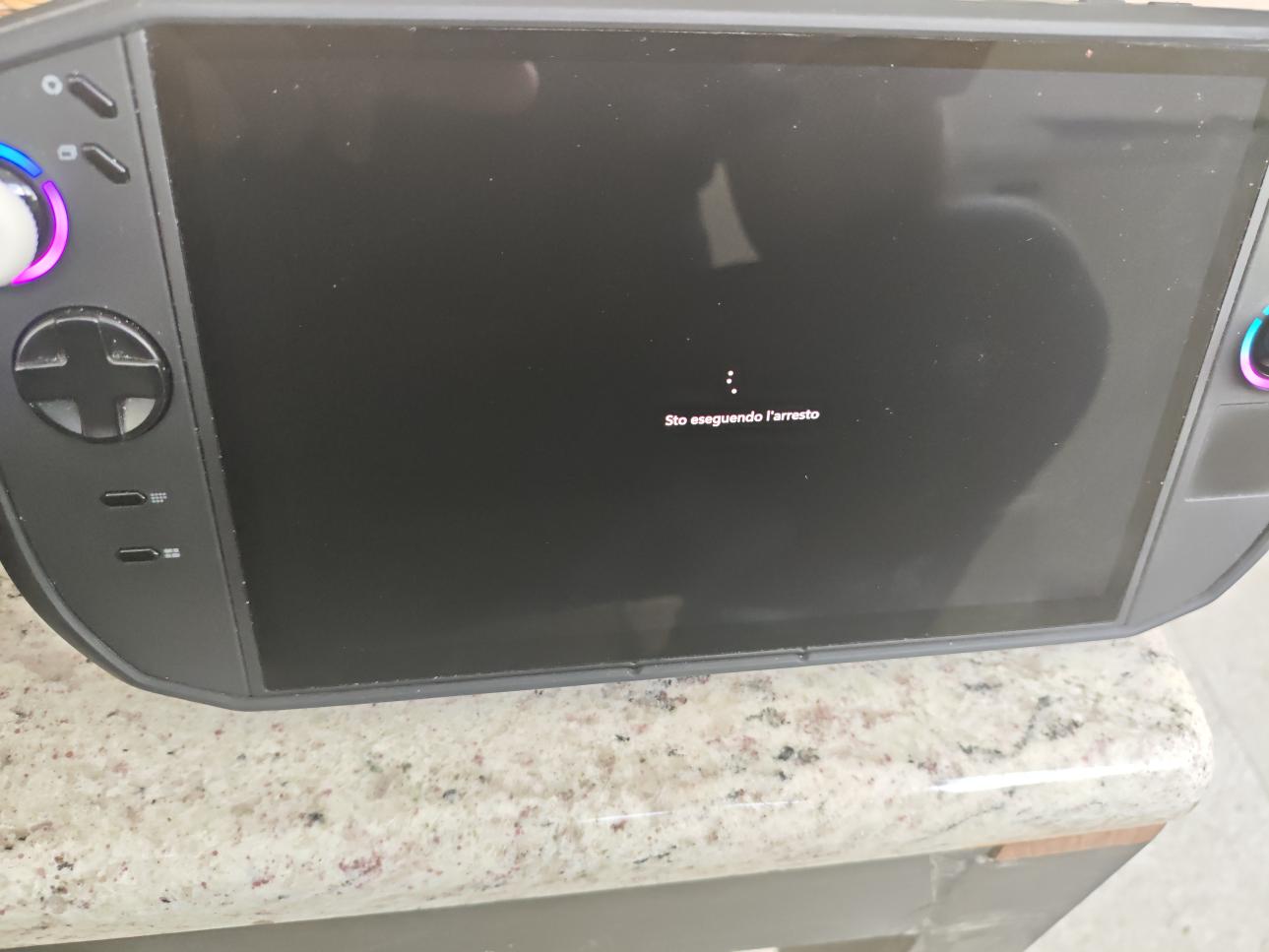
For about two months now, I've been dealing with the "shutdown issue": when I try to shut down my Go, it gets stuck as shown in the picture... "Shutting down...". Other times, the screen turns off but the power button and the controllers remain lit, the fans stop spinning, and the Go starts to overheat. So I have no choice but to force it to shut down.
About a week ago, I updated to the latest BIOS available, but it didn't make any difference.
I installed all the latest driver updates: the first shutdown worked fine, then the problem came back.
I disabled "Fast Startup" in the Windows Control Panel: again, the first shutdown worked fine, but the problem returned on the next one.
I've tried every solution I could find on Reddit, but nothing has worked. Some people say that it eventually shuts down after 5–10 minutes, but I'm not comfortable leaving it like that for so long....
I don't have any more updates available, either through Windows Update or Legion Space. Honestly, I'm running out of ideas. Considering how many people online seem to be experiencing the same issue, I don't think (or at least I hope!!) that sending it in for repair should be necessary....
Has anyone managed to fix this? Do you have any suggestions? Thanks in advance for any help or replies!
Happy gaming, everyone!
P.S.
I don't have any bloatware running at startup, just Steam and Legion Space. I've tried to keep Windows as clean and lightweight as possible!
hey hey, from what i have read, it seems that the latest windows update from two months ago started the problem. multiple people said that rolling to the previous update fixes the issue. i hope this helps.
@mazen18 Hi, and thanks for your reply. It's very likely that an update is causing the issue, but I haven't figured out which one I'm supposed to remove. I've only found people recommending that I INSTALL ALL THE UPDATES (which I did, of course).
@Kaywen windows in general aren't really optimized and have problems every now and then on pc. and handhelds don't have a dedicated version so that causes issues.
@mazen18 I understand that Windows isn't properly optimized for this kind of device, but at the moment switching to another OS feels a bit premature to me. For the Gen 2, Lenovo had promised a version of SteamOS that was supposed to arrive in May this year. Then, in June, if I remember correctly, Valve released a BETA version of SteamOS to make it compatible with several handhelds, including the Go 2.
Personally, I was hoping for an officially supported version. I love the Go 2 because it lets me "squeeze in a few minutes of gaming" whenever I get the chance during the day or week. But if I have to spend time tinkering just to get it working properly with a beta OS, or even wait 10 minutes for it to shut down on its own (assuming that even works in my case, as some Reddit users have reported), it kind of defeats the purpose of a product that currently costs over €2,000...
And just to reiterate: only the official Windows installation, fully updated, Steam, NO cracked games, and NO third-party software. I don't think I've ever kept a Windows installation this clean in 30 years! 😂
@Kaywen i also think switching an os just to skip dealing with a problem is too much, and reinstalling should be the last step. i do believe it's solvable, the problem lies in not knowing what really causes the issue in the first place. and there's multiple people having the same problem, so it's not a user usage causing it. and besides, from what you have said it seems you're taking really good care of your devices.
do you have the xbox full screen experience? someone said turn off xbox mode / fse. Shut the device down. Power it up again and enable XBOX mode. That did the trick for them.
Yeah, it definitely sounds like a software issue. I just hope they can figure out what’s causing it, because having to reinstall everything over something like this would be a pain.
Update: I finally worked up the courage the other night and tried waiting a little longer before forcing it to shut down. As usual, it got stuck on "Shutting down...", the fans stopped spinning, while the LEDs remained on.
Since a user on Reddit suggested waiting it out, I decided to give it a try and kept an eye on the clock. After about 7 minutes in that state, the fans suddenly ramped up to full speed, and then the Go finally shut down.
I've had two more gaming sessions on my Go since then, and ever since that happened... it has shut down normally every single time, within a minute.
I'll run another test today during my lunch break at work, but so far it seems to be working fine...
I'll keep you posted. In the meantime, I'd like to thank everyone who took the time to help me and reply!
Here we are: I finished my 20-minute Final Fantasy VII session a little while ago. I shut down the Go directly from the Legion Space quick menu, and everything worked perfectly.
Could that really have been all it needed? Just waiting? Maybe I'm a little too paranoid about my devices, and when I noticed it heating up, I was worried I might damage it. 😅
Registration to this forum is free! We do insist that you abide by the rules and policies detailed
below. If you agree to the terms, please check the 'I agree' checkbox and press the 'Complete Registration' button below.
If you would like to cancel the registration, click here
to return to the forums index.
Legion Community Terms and Conditions
Last updated 19th February 2021
Welcome to Legion Community (“Legion Community” or the “Platform") - powered by Standing on Giants*- an online communication platform operated by Lenovo (the “Client”).
Legion Community enables its registered users (the “Users") to post and share content, such as information about Lenovo products, services, events, social media activity and videos ("Content”) to the Platform.
Legion Community is provided by Lenovo through the services of Standing on Giants subject to these Terms (“Terms”). We reserve the right to amend these Terms at any time and without notice. If we amend the Terms, we will post the amended Terms on this page and indicate at the top of the page the date the Terms were last revised. Your continued use of the Platform after any such changes constitutes your acceptance of the new Terms.
By accessing or using Legion Community you signify that you have read, understood, and agree to be bound by these Terms. If you do not agree, then you should not access or use the Platform.
Lenovo’s decision in relation to any aspect of Legion Community and these Terms is final and binding.
Your Use of Legion Community Platform
ELIGIBILITY. This Program is open to Participants who are age 18 years or older at the time of entry. This Program is not open to: (1) employees or internally contracted vendors of [Client] or its parent/subsidiaries, agents or affiliates; (2) the immediate family members or members of the same household of any such employee or vendor; (3) anyone professionally involved in the development or administration of this Program; (4) employees or internally contracted vendors of governments and government-affiliated companies or organizations; or (5) any employee whose employer's guidelines or regulations do not allow entry in the Program. This Program is open to residents of Italy, Spain, Norway, Finland, Sweden, Denmark, Kingdom of Saudi Arabia, United Arab Emirates, South Africa. This Program is void in any other country and where otherwise prohibited or restricted by law.
HOW TO PARTICIPATE. To participate in the Program, visit accurately and truthfully complete the online registration form, agree to the terms and conditions of this Agreement, and follow the other instructions at the website listed above.
REWARDS. Subject to the terms and conditions of this Agreement, and once confirmed by [Client], Participants will be able to accrue “points” that can be redeemed for reward(s). Rewards will be featured at various price points and in limited quantities.
The approximate retail values of rewards are subject to change based on current market conditions at the time of reward redemption. Participants are not entitled to any surplus between actual retail value (ARV) of a reward and stated ARV and any difference between stated ARV and actual value of the reward will not be awarded. No substitution, assignment, transfer, or cash redemption of any reward is allowed. Lenovo reserves the right to substitute a reward with another reward of equal or greater value should the advertised reward become unavailable for any reason. If applicable, rewards may be fulfilled in the form of voucher(s), coupon(s) and/or gift card(s) in Lenovo’s sole discretion. If a Participant is unable to participate in or accept a reward or any portion of a reward for any reason, Lenovo shall have no further obligation to such Participant. Lenovo will not replace any lost or stolen rewards after redemption by Participants. In no event will Lenovo be responsible for fulfilling more than the stated number of rewards. Participants acknowledge and agree that rewards are available in limited quantities and reward type and availability are subject to change at Lenovo’s sole discretion. Lenovo shall have no obligation or liability to Participants for any changes made to reward type or availability.
Subject to your compliance with these Terms, Lenovo grants you a non-exclusive, non-transferable, limited right to access and use the Platform only for your personal, informational, and non-commercial use. You agree not to interrupt or attempt to interrupt the operation of the Platform in any way or circumvent or attempt to circumvent any security feature of the Platform. Your use of the information and Content available on the Platform is subject to the following restrictions:
You must not modify or remove any and all copyright, trademark or other proprietary notices contained in the Content.
You must not modify the Content in any way or reproduce or publicly display, perform, or distribute or otherwise use the Content for any commercial purpose.
No title or ownership rights in the Content or any intellectual property rights therein are transferred to you under these Terms. You may never use another user's account without the permission of that user. When creating your account, you must provide accurate and complete information and you must keep your account password secure. You must notify Lenovo immediately of any breach of security or unauthorised use of your account. Lenovo will not be liable for any and all losses caused by any unauthorised use of your account
You agree not to collect or harvest any personal data from the Platform including any personally identifiable information such as but not limited to account names, nor to use the communication systems provided by the Platform for any commercial solicitation purposes. You agree not to use any portion of the Platform as a destination linked from any unsolicited bulk messages or unsolicited commercial messages.
Your Content Posted or Linked to Legion Community
Lenovo allows you to submit posts or link content to Legion Community, including photos, images, videos, sounds, comments, links, tweets, likes, and other materials. A Legion Community moderator will moderate all posts after publication. Lenovo reserves the right to remove user’s content that it considers to be irrelevant to the purpose of the platform, or that it considers violates any of these Terms. Lenovo may also post or link to the Platform any of your Content that you make available to Lenovo for the Platform. You are solely responsible for your Content that is posted or linked to the Platform and Lenovo accepts no liability for your Content.
You grant Lenovo and other users of the Platform a non-exclusive, royalty-free, transferable, sub-licensable, worldwide license to use, store, display, reproduce, modify, create derivative works of, perform, publish, re-post, re-tweet, and distribute your Content on or in connection with the Platform.
You represent and warrant that you have all rights necessary in your Content for it to be on or available from the Platform, and that the posting and use of your Content on or through the Platform does not violate, misappropriate or infringe on the rights of any third party, including, without limitation, privacy rights, publicity rights, copyrights, trademark and/or other intellectual property rights. You further represent and warrant to the extent there are links on the Platform to your Content that is hosted on third party websites, such linking is permitted by the terms of service of any such third party websites. You agree to comply with all laws, rules and regulations applicable to your use of the Platform and your Content, including but not limited to copyright laws.
You agree that your Content will not include any violent, discriminatory, unlawful, infringing, hateful, defamatory, derogatory, harassing, pornographic or obscene photos, text, images, messages, references, content or other materials. In addition, your Content will not be confidential or proprietary, and Lenovo will have no confidentiality obligation regarding your Content.
You agree that Lenovo is only acting as a passive conduit for your online distribution and publication of your Content. Lenovo does not have any obligation to review your Content, and therefore does not guarantee the accuracy, integrity, or quality of all user Content and we cannot assure you that harmful, inaccurate, deceptive, offensive, threatening, defamatory, unlawful, or otherwise objectionable Content will not appear on the Platform. Lenovo is not responsible for any public display or misuse of your Content. Lenovo does however reserve the right to remove, exclude or modify your Content for any reason, at its discretion, including any Content that Lenovo believes violates these Terms or other applicable policies. UNDER NO CIRCUMSTANCES WILL LENOVO BE LIABLE TO YOU OR ANY THIRD PARTY IN ANY WAY FOR ANY CONTENT POSTED ON OR MADE AVAILABLE THROUGH A SITE BY YOU OR ANY OTHER USER.
Lenovo may reward points for certain activities on the Platform, including (but not limited to) sharing posts, creating posts and entering competitions. Subject to availability, Lenovo reserves the right at any time to amend, modify or retract any points, rewards or prizes earned on the Platform. You accept that Lenovo will not enter into any correspondence regarding the awarding of points or rewards and Lenovo is entitled to grant or revoke rewards at their discretion. The decision of Lenovo in relation to all aspects of this programme is final and binding.
Data Privacy and Security
Lenovo will communicate with you via email or push notifications (including via the Standing on Giants platform), about Legion Community related notices changes to features of Legion Community and any notices required by law, in lieu of communication by postal mail.. If required by law, we will ask you for consent before sending you marketing emails. Please note that you may unsubscribe to general marketing emails at any time using the link provided in the emails. You understand that your data may be shared with other Lenovo entities and trusted third parties with a contractual relationship with Lenovo solely in connection with Legion Community
Please read our Data Privacy Policy for more information on our privacy and security practices.
Representations and Warranties
You represent and warrant that:
(a) You will abide by and comply with these Terms;
(b) Your Content and Lenovo’s use thereof as contemplated by these Terms and the Platform will not infringe any rights of any third party, including but not limited to any intellectual property rights, privacy rights, and rights of publicity;
(c) You have the full power and authority to enter into these Terms and to the extent that any entity is bound hereby, to bind such entity, these Terms, and performance of obligations under these Terms do not and will not violate any other agreement to which you or such entity is a party; and
(d) You will comply with all applicable laws and regulations, including but not limited to those set forth in these Terms.
Compliance
When using Legion Community, you will comply with all applicable laws and regulations, and all terms of use and similar rules concerning your use of any Social Media Outlet or other third party publishing platform.
Upon our request made to you from time to time, you will cooperate with us and allow us access to your systems, communications, and records solely in connection with determining your compliance with these Terms.
Visiting Third Party Websites
The Platform may contain links to third party websites, advertisers, products, services, offers, or other events or activities that are not owned or controlled by Lenovo. Lenovo does not assume any responsibility for any such third party sites, information, materials, products, services or offers. If you access any third party website, product, service, or content from the Platform, you do so at your own risk and you agree that Lenovo will have no liability arising from your use of or access to any third party website, product, service, or content.
Trademarks and Ownership of Intellectual Property
Lenovo™, the Lenovo logo, and certain other product names and phrases are trademarks or service marks of Lenovo in the U.S. and/or other countries. The absence of a trademark or service mark designation next to a product or service name or logo belonging to Lenovo anywhere on the Platform does not constitute a waiver of Lenovo’s trademark or other intellectual property rights concerning that name or logo used or referenced on the Platform.
The Platform contains content owned or licensed by Lenovo ("Lenovo Content"). Lenovo Content is protected by copyright, trademark, trade secret and other laws, and, as between you and Lenovo, Lenovo owns and retains all copyright, trademark, trade secret, patent and other intellectual property rights in and to Lenovo Content and the Platform (the “Intellectual Property”). Lenovo reserves all rights in the Lenovo Content and Intellectual Property not expressly granted in these Terms. Lenovo does not permit the use of the Lenovo Content or its Intellectual Property in advertising, as an endorsement for any product or service, or for any other purpose, commercial or otherwise, without the prior express written permission of Lenovo.
Termination
You may terminate use of the Platform at any time for any reason (in other words, un-register). Lenovo may terminate or suspend your right to use the Platform at any time, with or without cause or notice to you. Lenovo may terminate the Platform at any time without notice. Upon termination, all licenses and other rights granted to you in these Terms will immediately cease. Following termination, Lenovo may retain your Content for a commercially reasonable period of time for backup, archival, or audit purposes. Furthermore, Lenovo and its other users may retain and continue to use, store, display, reproduce, modify, create derivative works of, perform, and distribute any of your Content that other users have stored or shared through the Platform.
Indemnification
You agree to defend, indemnify and hold harmless Lenovo and its employees, officers, affiliates and agents from and against any claims, liabilities, damages, losses, and expenses, including without limitation, reasonable attorney's fees and costs, arising out of or in any way connected with any of the following: (i) Your Content or your misuse of the Platform; (ii) your breach or alleged breach of these Terms; (iii) your violation of any third party right, including without limitation, any intellectual property right, publicity, confidentiality, property or privacy right; (iv) your violation of any laws, rules, regulations, codes, statutes, ordinances or orders of any governmental authorities, including, without limitation, all regulatory, administrative and legislative authorities; or (v) any misrepresentation made by you. You will cooperate as reasonably requested by Lenovo with respect to any such claim. Lenovo reserves the right to assume control of the defence or settlement of any such claim, and you will not in any event settle any such claim without the prior written consent of Lenovo.
Governing Law
These Terms are governed by the laws of England.
Entire Agreement; Severability
These Terms, together with Lenovo’s Data Privacy Policy and any amendments and any additional agreements you may enter into with Lenovo in connection with the Platform, shall constitute the entire agreement between you and Lenovo concerning the Platform. If any provision of these Terms is deemed invalid, then that provision will be limited or eliminated to the minimum extent necessary, and the remaining provisions of these Terms will remain in full force and effect.
Limitations of Liability
Neither Lenovo nor its affiliates, officers, directors, employees, agents, third party content providers, sponsors, or licensors warrant that the Site will be continuous, uninterrupted or error-free. THE PLATFORM, INCLUDING WITHOUT LIMITATION, ITS CONTENT, IS PROVIDED ON AN "AS IS" AND "AS AVAILABLE" BASIS. TO THE FULLEST EXTENT PERMISSIBLE BY LAW, LENOVO HEREBY DISCLAIMS ALL WARRANTIES, EXPRESS OR IMPLIED, INCLUDING, BUT NOT LIMITED TO, THE WARRANTIES OF MERCHANTABILITY, FITNESS FOR A PARTICULAR PURPOSE OR NON-INFRINGEMENT, OR ANY WARRANTIES BASED ON A COURSE OF DEALING. TO THE MAXIMUM EXTENT PERMITTED BY LAW, LENOVO SHALL NOT BE LIABLE FOR ANY INDIRECT, INCIDENTAL, SPECIAL, CONSEQUENTIAL OR PUNITIVE DAMAGES, OR ANY LOSS OF PROFITS OR REVENUES, OR ANY LOSS OF DATA OR USE, RESULTING FROM YOUR ACCESS TO OR USE OF OR INABILITY TO ACCESS OR USE LEGION COMMUNITY, EVEN IF LENOVO HAS BEEN ADVISED OF THE POSSIBILITY OF ANY SUCH DAMAGES IN ADVANCE.
*The Standing on Giants platform organizes brand content and allows platform members to discuss this content through written comments