


Over the past few weeks, my Legion Go has started having this 'rendering' issue with windows that don't have a maximize option. I even tried formatting it and starting completely from scratch, but the problem comes back after a couple of reboots. Just to be clear, I've tried both Windows 11 24H2 and 25H2. I also made some registry tweaks after asking an AI about the issue, but none of the suggestions fixed it. Any ideas?
Legion Go

Go 2 right controller keeps disconnecting.
Discussion
Hi.
so 2 days ago my right controller started disconnecting randomly or when I press the stick in.
When I reset the controller by pressing the reset button on the side it works perfectly till I restart my Go 2. After that this problem is coming back.
I don’t know what to do next. Any ideas?


Legion Go AMA - NA Senior Gaming Product Manager Ben Myers

Ask us anything about the Lenovo Legion Go!
For our first ever US Legion Gaming Community AMA, we're joined by Ben Myers.
Ben Myers is Lenovo's North American Senior Gaming Product Manager, who has a ton of info on our newly-announced Legion Go handheld device. We've seen a LOT of questions about the Legion Go, and after the success of EMEA's AMA with Sergey, we wanted to follow up with one for North America!
If you have a question about the Legion Go, drop it in a comment below. Ben Myers will be responding to questions periodically through tomorrow, Sep 29th.
Please UPVOTE other community questions you also want to know so that the most popular questions rise to the top!
Special shoutout and thanks again to Ben Myers.
View 98 more replies
Does the micro SD slot have bootable functionality (ex. for recovery images, linux distros, etc) ? The Steam Deck does, but the ROG ALLY does not.
No FPS limiter in Legion Space?
Discussion
So I bought a Go S Z2 Go Windows edition a few days ago, but for some reason in the quick access bit of legion space there’s no fps limiter option like there should be. I’ve made sure everything is updated within legion space and windows updates. Anyone got any ideas?
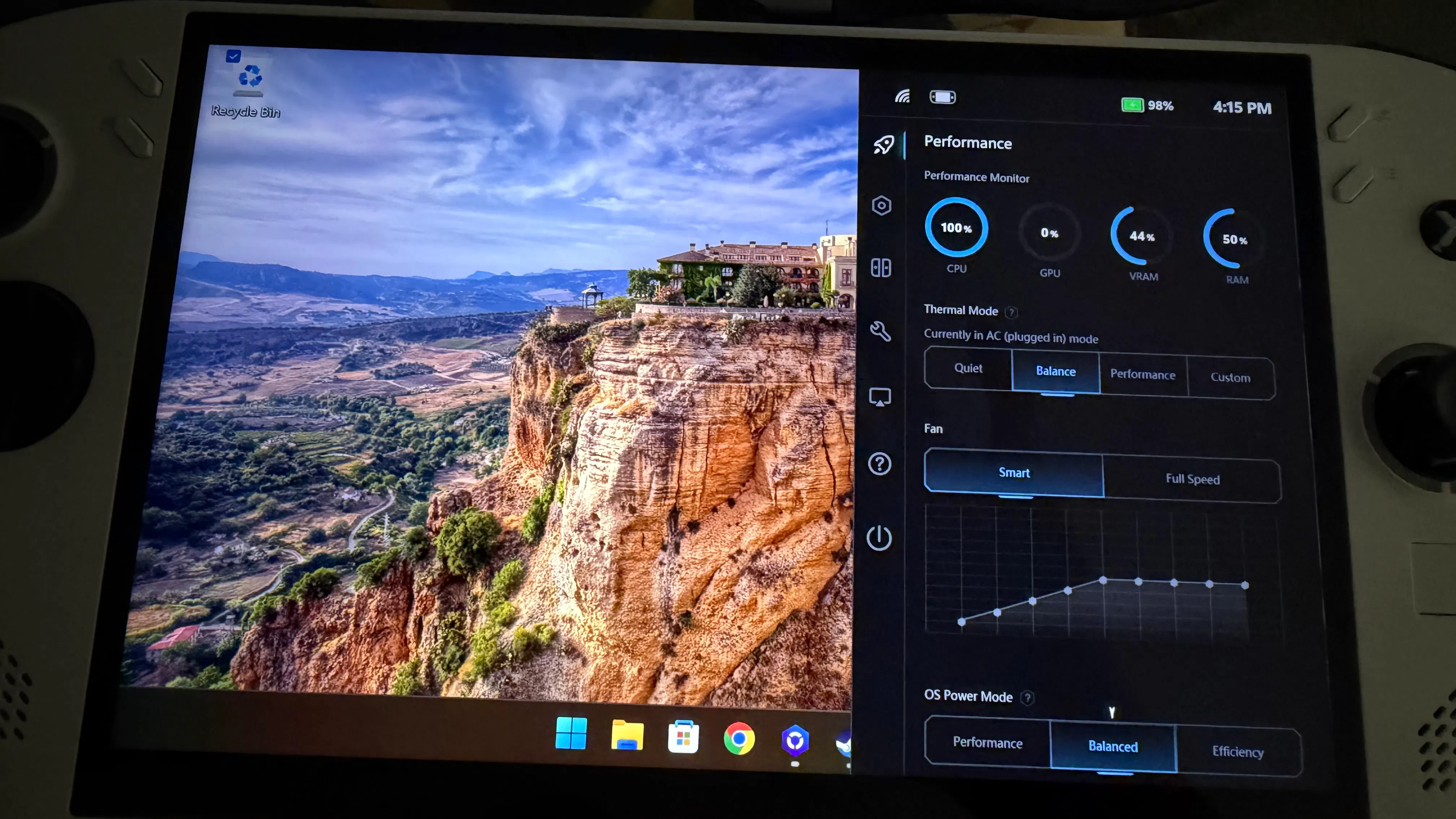

Probably under display setting - unless you are missing any software (bridge or others?)
Legion go 2 z2 extreme questions
Discussion
Hello, I had the original Legion Go, I was looking into the Legion Go 2 with the Z2 extreme processor, but the price is pretty insane now, what are people’s thoughts on it, is it worth the around $600 dollar price increase they’ve done to it?
View 11 more replies

Na, the performance difference is not that large. The new controllers are great, though. I ended up buying those to use on my Go 1. I initially thought about upgrading, but after seeing real-world comparisons, the performance gain for the price was not worth it. I'll probably wait until technology improves or, perhaps, until game makers finally start optimizing their games to run better before I upgrade.
When you're paying 2000$ for a device, the number of comprises that you're willing to accept goes down- and if anything, the device should be flawless. These would be my dealbreakers regarding the Legion Go 2:
The Z2E is only around 20% better than the Z1E (though much faster at lower wattages).
RDNA 3.5 - does not support the newest FSR4+ upscaler (AMD has been beating around the bush with this issue)
Legion Go 2 only has USB4 (instead of the faster USB4v2 or TB5)
Heavy / high fan noise.


Legion Go Update 11.02.23
Hi All,
Wanted to provide some updates/information during the launch window. I know this doesn’t address all concerns from all current and prospective owners but I wanted to provide the updates we do have. All below subject to change and only indicative of plans at the time of writing. Some are follow-ups from the AMA.
- Space: Another update coming around November 10th, and another 2-4 weeks after that.
- Space: Darker UI option will be released around November 10th
- Space: DPI Settings for FPS mode will appear in Controller settings once FPS mode is toggled on (already implemented in 1.0.2.1)
- Space: Right Legion button optimizations are being worked on so that it is quicker and more intuitive to access performance settings and toggles.
- Space: Trackpad DPI and Joystick Deadzone management are work in progress
- Space: Working on making "Apply Game Profile" more intuitive, some improvements coming around November 10th
- Drivers: New VGA drivers are coming very soon (within next 72 hours) and can be found here when available:
- https://pcsupport.lenovo.com/us/en/products/laptops-and-netbooks/legion-series/legion-go-8apu1/downloads
- Gyros: 3 Total, one in each controller and one in the main unit.
Thank you.
View 70 more replies
I'd be really excited for this update if I won one of these 🙂

View 4 more replies

I honestly didn't realize it was released back in 2023 😅 I love mine and would definitely recommend it to others especially with how crazy pricing has gotten lately.
Yes it is and really nice with a good bigger monitor. I like the compactness of it, more then I thought I would compared to a normal PC.
Awesome device how do you use it?
Discussion
The LeGoS is an amazing device and I’ve been enjoying it everyday after work. I also bring it with me to work incase I want to sit outside and play while on break.
how do you guys use yours and what out of the ordinary places do you take it to?
View 4 more replies

i have a ideapad. its good i guess, but I thirst for a 7i. the beauty of it!
One of my kids has a weekly 50 minute appointment just a little too far away traffic-wise for it to be worth it to drop them off and come back. Perfect for some Crypt Custodian or Phoenix Wright on my Legion Go S. That's actually the main time and place I use it.

Legion Space Update
Discussion
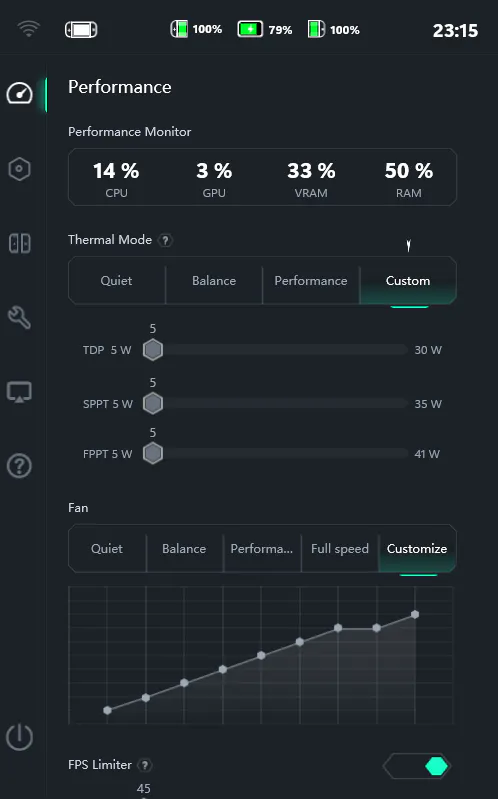
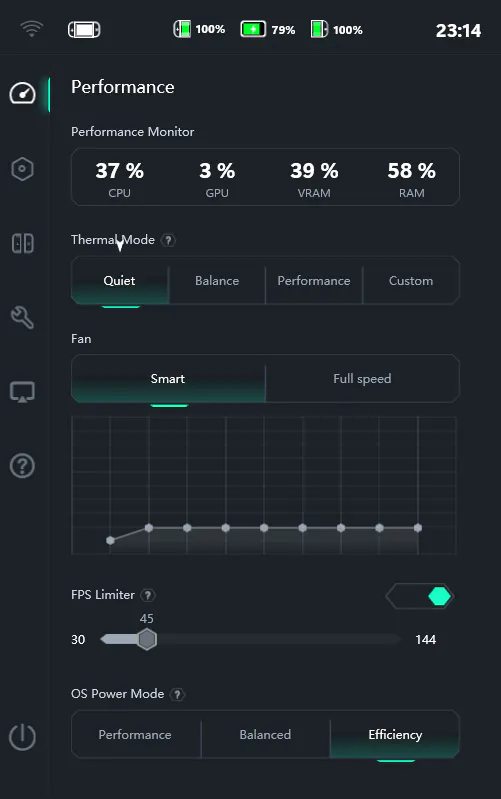
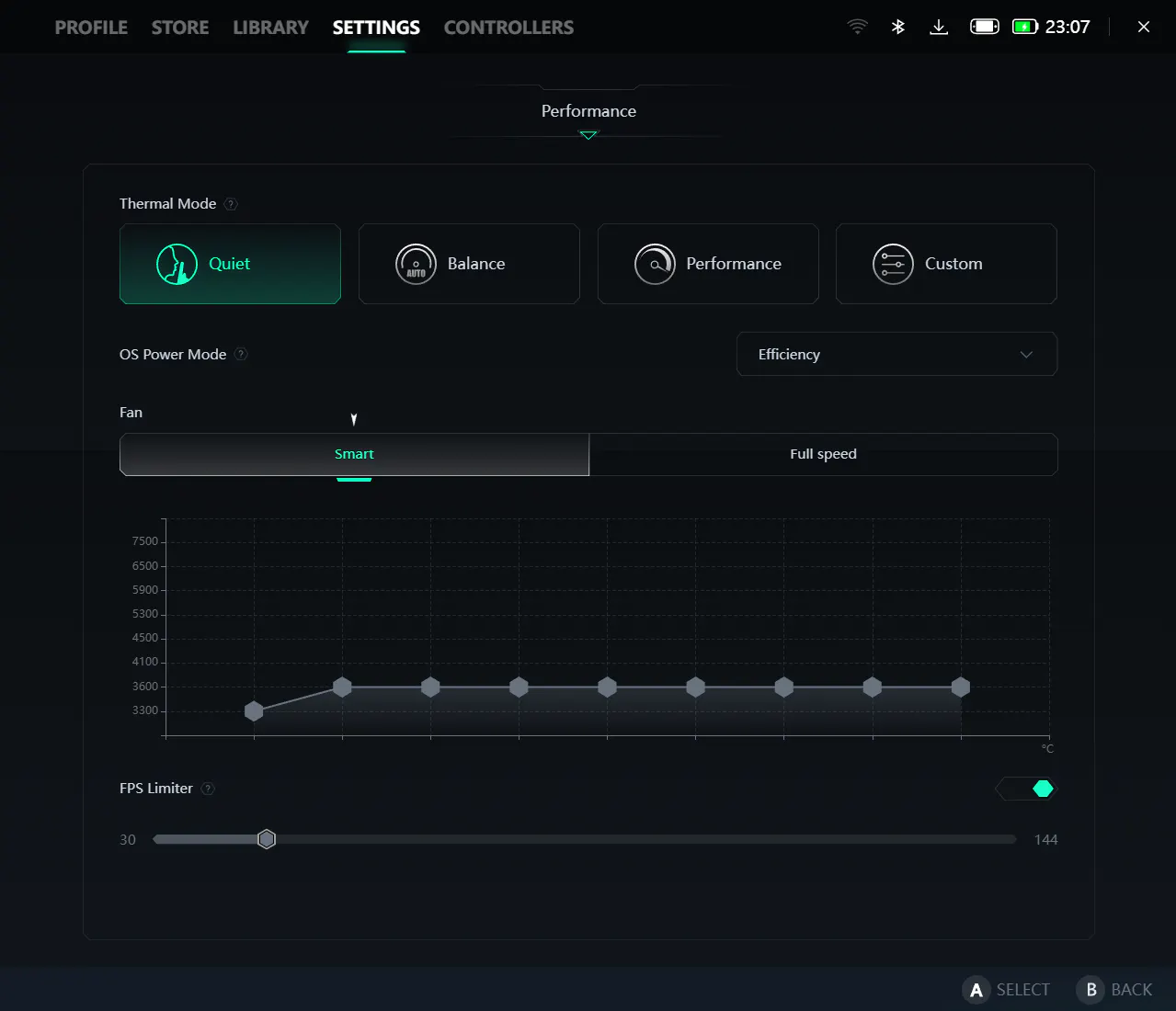
Just got an update for Legion Space and the controller. But it seems TDP settings and fan speed control for each power profile are gone and only allowed on custom settings now. Did Lenovo move it somewhere else? Or they decided to remove it? 😐
I prefer the old one to be honest. Where I had the full control of TDP settings and fan speed control for each power profile.
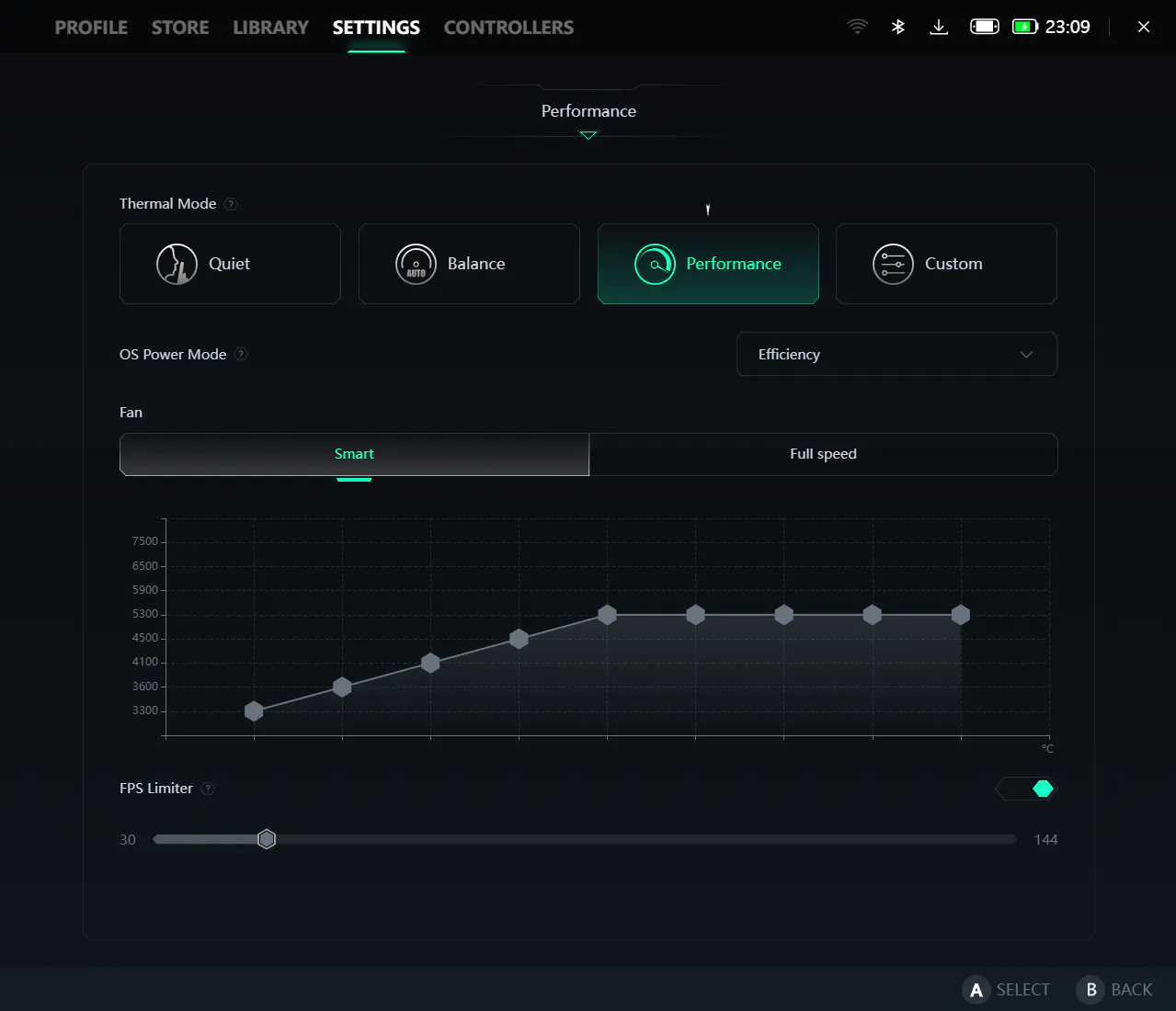
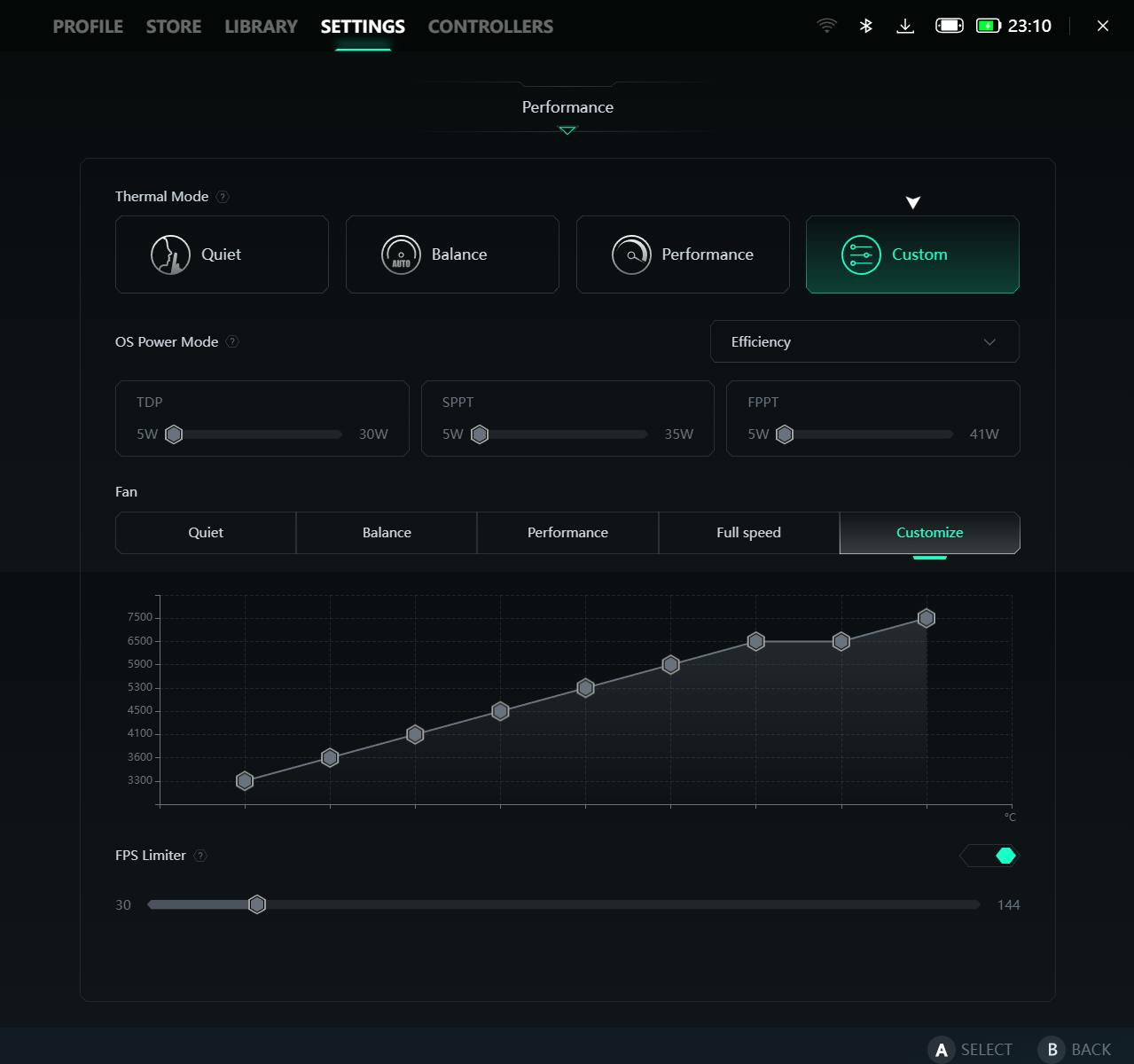
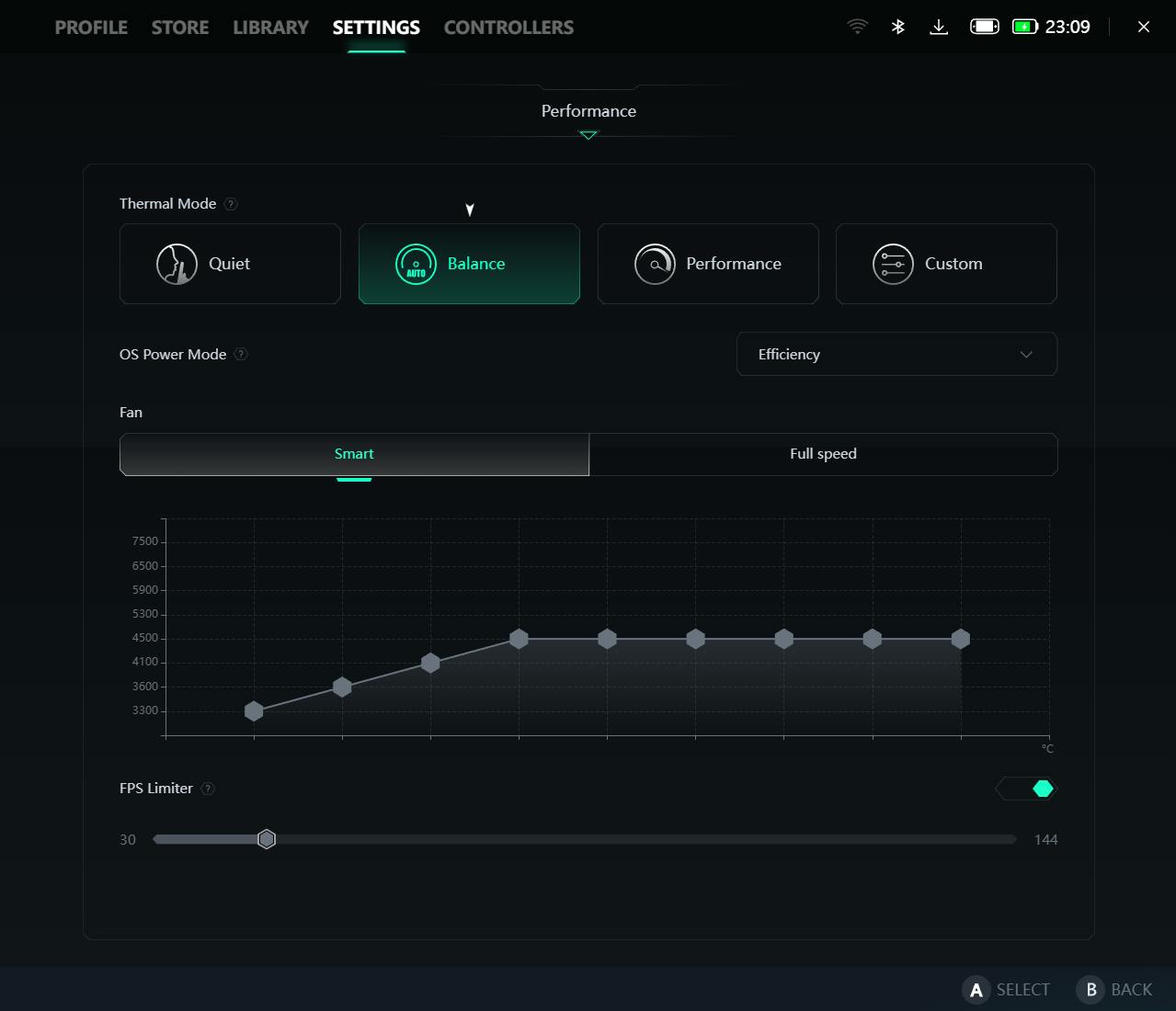
View 3 more replies
so no solution yet to customize the fans curve?
this is so sad .... i got a cooling pad wich is very efficient to exactly avoid having the internal fan to go up more then 50 %, and now we"re having 80% for 69° GPU ? why ????????????????????
I admit I never changed any of the settings other than turning on Performance mode when playing a game, but that is disappointing if they did take away the ability to tweak things.
Legion Go Controller Connector 3D Files
Hi All,
We've been working on some 3D files for community release. This is not 100% to where we wanted it to be but considering how long it's been I wanted to try to at least get what we have out to the community. You're free to tinker with and use this however you want. It is a draft/prototype for a controller holder and Pogo Pin cover:

This at least gives you the rail designs to work with for other projects you may want to pursue as well. We're not releasing this with any kind of license or restrictions as this was intended for community/general use. We will at some point have an official controller connecter available for the Legion Go that is not based on this design.
If you have any feedback feel free to leave it here and I can pass along to the mechanical engineering teams. While I will continue to look for opportunities to release additional 3D files this may be all we get for a while.
Files (zipped): Legion-Go-STP.zip
Thank you!
View 8 more replies
Any chance someone has these files that they can reupload? Both links on this page are broken.
Thanks!
View 17 more replies
Yup, the price go crazy in my country and it's also rare. Meanwhile, MSI and Asus handheld PC are easy to find and more affordable too.
It won't get better until the AI goons stop thinking they'll make a gazillion dollars selling us vibe-coded crap. The good news is that some recent news articles suggest that at least half of the datacenters planned for 2026 have been canceled or postponed. Let's hope the AI hype dies out so those postponements also turn into cancellations, and the rest of us can buy a decent gaming rig again.
[Original Legion Go] It keeps restarting after I launch a game after waking up from sleep
Discussion
Hi!
I just noticed recently that my Legion Go is restarting every time after putting it to sleep, waking up, and launching a game. Launching a game after the restart works as intended, the game starts normally. Did anyone else experience such behavior?
I have all the official software updated (including the official GPU drivers from the lenovo website).
View 6 more replies
I have same issues both windows and bazzite...
still occurs after factory rest through usb stick
I have the same problem; it is not related to temperature or thermal mode. It happens regardless of the performance mode settings.
I changed the sleep function to hibernation and the problem does not occur.
This is a result of an update because sleep did not cause this issue before.
Legion Go 2 performance
Discussion
The Legion Go 2 have serious performance issues. No matter the TDP setting you use, the CPU will always steal power from the GPU.
For example if TDP is set to 17W, the CPU will always keep 10 Watts for itself starving the GPU. The Xbox Ally X on the other hand, uses 5 to 6 Watts for the CPU.
This is what me and many other people observed in Bazzite. This issue is not tied to Bazzite though, Windows have it too.
It's a software issue that can 100% be fixed with a Bios update.
Spread the word so that Lenovo can fix it.
I have noticed the same thing, it makes any TDP preset below performance pretty much unusable. The CPU will almost always draw 10+ watts no matter the game even on the quiet preset.
GO’s gyroscope on emulation.
Hello people! I wanted to satisfy a curiosity, I prefer not to use handheld companion, as it conflicts with legion space by changing all the tdp and settings. Were you able to get legion go's gyroscope to work using riujinx? It doesn't work for me. although I also tried to activate it from legion space. I want to play my backup copy of Another code, but I get stuck on the first puzzle, where you have to rotate the stool to get the key out, where you have to use the gyroscope.
It's really embarrassing that months after the release of Legion Space, it still seems like software in the beta phase. With few options, and those few also incomplete. What's the point of the gyroscope being able to emulate the right or left analog? the gyroscope must be a motion sensor. stop. it doesn't have to emulate anything. however in legion space you can only set it as a right or left stick emulator. I won't install handheld companion as I said, because it conflicts with legion space. but lenovo, DO YOU WANT TO WAKE UP? graphic updates after months, legion space in beta phase, the guy who was here to answer users before the release of legion go has disappeared. Were you just waiting to make money with this product and then not care about consumers? I answer, yes.
View 1 more replies
Lenovo if you want I can tell you how to do it. in the legion space settings, under the “comport gyro” item (that's in Italian), you have to implement the yaw and roll functions, not just that it emulates the right or left stick. ASUS on rog ally has been doing this for a long time. Why not you? I would like to use this device completely and take advantage of it 100%, but if I don't have support from the manufacturer, it becomes impossible. To date the solutions are: install handheld companion which installs a lot of other programs that I don't know what they are for, and also conflicts with legion space by modifying the tdp and settings, as well as being quite complex and intrusive as a program, or use a program like ds5windows (or ds4 Windows) to trick the system that the legion go controller is actually a dualshock or dualsense. or another option would be to play with an xbox controller or a PlayStation controller, in which the gyroscope is correctly recognized. but at this point I wouldn't get a handheld if I have to play with an external controller. I would have directly gotten a desktop PC or laptop. So please try to resolve this situation. I also wanted to point out to you (but I think you already know this) that with the new video drivers, the fps counter no longer works.
View 15 more replies
I have seen something similar. Considering that in the 2+ years the Original GO has been out, and we got like 5 updates, I don't know if we are missing much. Honestly, this has been my biggest gripe: the lack of care from Lenovo to update the device.
Agree it's absolutely ridiculous the lack of updates that are released for the OG GO, especially the GPU drivers.
Seriously changed my opinion of Lenovo.
Lenovo repair sent me back a broken device
Discussion
I have another thread about how my battery was declined despite having warranty. They accepted it after having to go through a bunch of different customer support people.
I sent the device in and they emailed me a week later and said my SSD was now broken. I have pictures showing with a date in the screen it was sent in as working.
they asked, and I told them to fix it. They did not. They sent the device back with no SSD installed and damage to the back cover. Now I have a device that is basically dead, and to top of off the battery was at 0% and I question if they even replaced that.
it’s been days and not a single call back from customer service about it after I’ve contact multiple times.
I’ll probably most likely return the Go 2 I recently purchased as I don’t have faith in this company any more.
I’m not even mad. Just highly disappointed that after over a month of asking them to honor my warranty, they send back a device that isn’t working and worse off than when it was sent in.
View 14 more replies
If you’re stuck waiting on Lenovo again, I’d try getting a quick third‑party look just to know what’s actually damaged. I once had a hinge issue that a depot kept misdiagnosing, and breakfixnow laptop hinge repair sorted it in under an hour and told me exactly what was busted. Having that info made dealing with the manufacturer way less of a headache later.
I spoke with a Lenovo manger today. He was extremely rude. He went from telling me he would replace the device with any other Go including the go 2. But the go 2 is out of stock so I wasn’t expecting it anyways.
I agreed to just replace it with the original device I own. But, I had one request that send him into a rant.
I asked him if I could keep my controllers as they no longer sell them anywhere and I had broke one in the past for basic use. This, for whatever reason, made him rant at me for a good 2-3 straight minutes how I can’t just keep random parts off the device. He even went on to say
“ Sir you can’t keep the controllers. I’m not going to let you keep them so you can stock pile accessories and still have a refund”
I again, explain to him that I understand where he is coming from and if my controllers ever break, I have no way of getting a replacement.
I told him I’ve been going through this for months and should have had this device replaced in a week. A simply compensation of used controllers shouldn’t be a deal breaker.
He also said he was just to refund me instead of replacement the device.
He interrupted me and said “you know what. Keep the controllers, have a good day” and ended the conversation.
Like wrf?
This dude went from “I’ll replace the device with the latest and greatest (his actual words) to throwing a fit for a simple request and wants to cash refund me instead.
I’m actually mind blown right now how this went down and ended

Who has tried the new SteamOS Preview 3.8.0 On Their Legion Go?
Discussion
Lenovo has posted about the recent update including several beta improvements that should help owners of the Legion Go 2. https://gaming.lenovo.com/news/post/steamos-3-8-0-preview---legion-go-2-changes-ydGiqeOPmNxRLfa
The update notes on the Steam page release seem more general and don't mention Legion Go devices in particular.
https://store.steampowered.com/news/app/1675200/view/532126482488623649?l=english
I am curious if anybody here has tested this preview update on their device(s). I am also interested in people who own older versions of the Legion Go to hear their experiences.
Thanks for sharing!
View 1 more replies
Try Cachy OS Handheld edition ;) better support for the LeGo 1 with also better optimizations. I have it on mine and i love it <3

Motion Related Drift (Legion Go S)
Discussion
I was wondering if anyone else had experienced their joysticks having significant movement when they move their device, almost like gyro but not quite as consistent. I haven't experience this bug (or feature I guess) with any other devices so I was wondering if it was a legion go thing I wasn't understanding or a shared experience at least.

A Tribute to Lenovo
Discussion

See Video ↑ ↑ ↑ ...

A Tribute to Lenovo
https://www.youtube.com/watch?v=khiJcsibj6A
My experience with Linux (Nobara Steamdeck Edition) on the Lenovo Legion Go (Very Positive!)
First, a disclaimer - I have been using Linux for many many years and things that most people consider difficult or obtuse are easy for me. So any statements about Linux's ease of use should be taken with a bit of salt. 😁
So I bought my Lenovo Legion Go with the full intent to dual boot with Linux, and I couldn't be happier!
Nobara Steamdeck Edition was really easy to install (relative to other linux distros) and 90% of the device's features are working without doing anything else.
However, I'm a bit picky so I swapped out a bootloader that supported touchscreen selection (rEFind), and found a wonderful guide that brings the functionality almost to parity with Windows (and actually superior in a few ways) - https://github.com/aarron-lee/legion-go-tricks
The end result is something that feels better to use than Windows. Nobara running in "Gaming Mode" (Big Picture) uses only 1.6GB of barely breaks 2.5GB with a third party launcher running. This means that setting the UMA memory allocation (Vram allocation) to 8GB works a lot better! Even launching into "Desktop Mode" provides a better experience than Windows 11 in many places - mainly resource usage and responsiveness.
Ultimately, I'm considering shrinking my Windows partition to be only used for Firmware and Bios updates going forward. Linux provides that good of an experience for me.
Linux still probably isn't for the non-technical quite yet, but in a year or two, it might be! In the meantime, if you like to tinker, consider this an enthusiastic recommendation to give it a shot!
View 4 more replies
Thank you, very valuable info here.
Hope for more support by Lenovo on Linux.
But, in the meantime, community is doing a great job!
This is awesome to hear, I was also thinking about doing the same thing to try squeeze out some better 8gb vram performance. I've worked with various Linux distros over the last 5 years, while windows is very user friendly its sooo much nicer to have a lightweight OS running the show without hogging so many resources.
…

View 12 more replies
Welcome to the fold, great bit of hardware!! Here's to plenty of great gaming hours ahead, enjoy!!!
LegionSpace doesn't start anymore at all after 24H2 Windows 11 Update
Discussion
Hi guys,
are you currently also experiencing your LegionSpace not to start anymore? It is a real pity...
After the first 24H2 Windows 11 Update it worked, after restarting the system (without any update) it suddenly stopped working at all anymore...
Than I tried to install the second 24H2 Update and nothing changed...
Also deinstalling and reinstalling LegionSpace didn't help... It is really annoying not to be able to access to the side menu of LegionSpace anymore to be able to change important settings like brightness/TDP and so forth...
Once I klick onto the LegionSpace button, Legionspace tries to start up and the screen is getting black, after 4-5 seconds it crashes and doesn't start up and goes back to the normal Windows 11 screen without starting the software...
Ben Green Are you aware of this issue? I never had it before, and it seems to be in conjunction with the latest Windows update...
Would you replace your desktop entirely with a legion go and a power hub?
Discussion
Been thinking of replacing my desktop with a legion simply for the versatility. I know i will need an eGPU for intense gaming but i'd settle for default graphics setting. What ya'll think?
View 25 more replies
I likely will not be doing that, as I do need the power of my desktop for both intense gaming, and some of the other gaming-associated work I do. For that, I much prefer the desktop's larger size, which allows it to cool more effectively (plus more RAM/and better GPU).
Any words on Go Gen2 Steam version's pricing?
Discussion
Planning to use it as a gaming device and occasionally boot into Windows. Thinking I should wait for the Steam version to save a few bucks.


I like the latest Legion Space
Discussion
Legion Space has been making new attempts, which is a good thing. It is hoped that they can have more innovations while understanding users' preferences, such as expanding lighting effects and automatic performance configurations for more games.
4
About
The official Legion Community discussion group for the new Lenovo Legion Go! Get updates on new roadmap features from Legion product managers, plus tips and guides from fellow community Go product owners.
1514 members
1019 posts